Ever wondered why your server crashes or your app slows down? A solid system monitor is the unsung hero keeping everything running smoothly behind the scenes. Let’s dive into how it works and why you can’t afford to ignore it.



What Is a System Monitor and Why It Matters

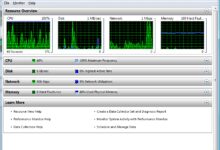
A system monitor is a software tool designed to track, analyze, and report on the performance and health of computer systems, servers, networks, and applications. It acts like a digital doctor, constantly checking vital signs such as CPU usage, memory consumption, disk I/O, and network activity.
Core Functions of a System Monitor
The primary role of a system monitor is to provide real-time visibility into system operations. This includes tracking resource utilization, detecting anomalies, and alerting administrators before small issues become critical failures.
- Real-time performance tracking of CPU, RAM, disk, and network
- Automated alerting for threshold breaches (e.g., 90% CPU usage)
- Historical data logging for trend analysis and capacity planning
“Without a reliable system monitor, managing IT infrastructure is like flying blind—eventually, you’ll crash.” — IT Operations Expert, Jane Rivera
Types of System Monitoring
Not all monitoring is the same. Depending on the environment, different types of system monitoring are employed:
- Hardware Monitoring: Tracks physical components like temperature, fan speed, and power supply status.
- Software Monitoring: Observes application performance, service availability, and process health.
- Network Monitoring: Analyzes bandwidth usage, latency, packet loss, and connection status.
- Cloud Monitoring: Focuses on virtualized environments, containers, and microservices in platforms like AWS or Azure.
Each type plays a crucial role in maintaining system integrity, especially in hybrid or multi-cloud setups where visibility can be fragmented.
Top 7 System Monitor Tools You Should Know
Choosing the right system monitor can make or break your IT operations. Here are seven of the most powerful and widely used tools in the industry today.
1. Nagios XI – The Veteran Powerhouse
Nagios XI has been a cornerstone in system monitoring for over two decades. Known for its robustness and flexibility, it supports thousands of plugins and integrations.
- Highly customizable dashboards and alerting rules
- Supports both on-premise and cloud deployments
- Extensive community and third-party plugin ecosystem
While its interface may feel dated, Nagios XI remains a top choice for enterprises that need deep control over their monitoring environment. Learn more at Nagios Official Site.
2. Zabbix – Open Source with Enterprise Muscle
Zabbix stands out for combining open-source freedom with enterprise-grade features. It’s a full-featured system monitor that handles everything from server metrics to network device tracking.
- Auto-discovery of network devices and services
- Advanced visualization with custom graphs and maps
- Built-in event correlation and problem escalation
Zabbix scales exceptionally well, supporting environments with tens of thousands of monitored devices. Its active community and commercial support options make it ideal for growing organizations. Visit Zabbix.com for downloads and documentation.
3. Datadog – Cloud-Native Champion
Datadog is built for the modern cloud era. As a SaaS-based system monitor, it excels in monitoring dynamic environments like Kubernetes, AWS, and serverless architectures.
- Real-time dashboards with AI-powered anomaly detection
- Seamless integration with 500+ tech stack components
- Log management, APM (Application Performance Monitoring), and security monitoring in one platform
Datadog’s strength lies in its unified observability approach. Instead of juggling multiple tools, teams get logs, metrics, and traces in a single pane of glass. Explore its capabilities at DatadogHQ.com.
4. Prometheus – The DevOps Favorite
Prometheus is an open-source system monitor born from SoundCloud and now a CNCF (Cloud Native Computing Foundation) project. It’s especially popular in DevOps and Kubernetes environments.
- Pull-based monitoring model with time-series database
- Powerful query language (PromQL) for deep data analysis
- Highly scalable and designed for reliability
Prometheus shines when monitoring microservices, where metrics are exposed via HTTP endpoints. While it lacks built-in alerting dashboards, tools like Grafana fill that gap perfectly. Check out Prometheus.io for setup guides.
5. SolarWinds Server & Application Monitor (SAM)
SolarWinds SAM is a comprehensive solution for monitoring both physical and virtual servers, as well as business-critical applications like SQL, Exchange, and SAP.
- Pre-built templates for over 1,200 applications
- Deep application dependency mapping
- User-friendly interface with drag-and-drop dashboard creation
It’s particularly favored by mid-sized businesses for its balance of power and ease of use. However, some users note higher licensing costs compared to open-source alternatives. Learn more at SolarWinds.com/SAM.
6. PRTG Network Monitor – All-in-One Simplicity
Paessler’s PRTG is a Windows-based system monitor that’s praised for its intuitive interface and zero-configuration sensors.
- Auto-discovery of devices and services
- Over 200 sensor types (SNMP, WMI, NetFlow, etc.)
- Free version available for up to 100 sensors
PRTG is ideal for IT teams who want quick deployment without sacrificing depth. Its centralized dashboard gives a holistic view of network and system health. Visit Paessler.com/PRTG to try the free version.
7. New Relic – Full-Stack Observability
New Relic offers a modern, cloud-based system monitor focused on full-stack observability—from infrastructure to frontend user experience.
- Real user monitoring (RUM) to track website performance
- AI-driven insights and automated root cause analysis
- Free tier with generous limits for small teams
Its strength is in connecting backend performance to frontend impact, making it invaluable for customer-facing applications. Explore New Relic at NewRelic.com.
Key Metrics Tracked by a System Monitor
To truly understand system health, a system monitor tracks a range of critical performance indicators. These metrics form the foundation of proactive IT management.
CPU Usage and Load Average
CPU utilization is one of the most fundamental metrics. A system monitor tracks how much processing power is being used and whether the system is under sustained load.
- Consistently high CPU usage (>80%) may indicate inefficient code or resource leaks
- Load average shows the number of processes waiting for CPU time over 1, 5, and 15 minutes
- Sudden spikes can signal DDoS attacks or runaway processes
Monitoring CPU trends helps prevent slowdowns and ensures optimal application responsiveness.
Memory (RAM) Utilization
Memory monitoring is crucial because insufficient RAM leads to swapping, which drastically slows down systems.
- A system monitor tracks free, used, cached, and buffered memory
- Swap usage is a red flag—high swap indicates memory pressure
- Memory leaks in applications can be detected over time through gradual consumption increases
Proper memory monitoring ensures applications run smoothly and helps plan hardware upgrades.
Disk I/O and Storage Health
Disk performance directly affects application speed, especially for databases and file servers.
- Read/write latency and throughput are key indicators
- High I/O wait times suggest disk bottlenecks
- SMART data from drives can predict hardware failures before they happen
By monitoring disk health, a system monitor can prevent data loss and downtime due to failing drives.
Network Performance Metrics
Network monitoring ensures connectivity and performance across distributed systems.
- Bandwidth usage helps identify congestion points
- Latency and packet loss affect real-time applications like VoIP and video conferencing
- Connection states (TCP/UDP) reveal potential security threats or misconfigurations
A robust system monitor correlates network data with application performance to pinpoint issues quickly.
How System Monitor Enhances Security
While primarily seen as a performance tool, a system monitor plays a vital role in cybersecurity.
Detecting Unauthorized Access and Anomalies
Unusual login attempts, unexpected process executions, or sudden spikes in outbound traffic can signal a breach.
- System monitors can trigger alerts on failed SSH attempts or privilege escalations
- Anomaly detection algorithms identify deviations from normal behavior
- Integration with SIEM (Security Information and Event Management) tools enhances threat visibility
For example, a sudden increase in CPU usage from a background process might indicate crypto-mining malware.
Monitoring Service Availability and Uptime
Downtime isn’t just inconvenient—it can be a symptom of attack or misconfiguration.
- Continuous ping and port checks ensure critical services are running
- HTTP/HTTPS monitoring verifies website availability and response time
- DNS and SSL certificate expiration alerts prevent outages
By ensuring services stay online, a system monitor acts as a first line of defense against denial-of-service attacks.
Log Aggregation and Forensic Analysis
Modern system monitors collect and analyze logs from multiple sources.
- Centralized logging makes it easier to trace attack vectors
- Timestamp correlation across servers helps reconstruct events
- Automated log parsing identifies suspicious patterns (e.g., repeated 404 errors)
Tools like Datadog and New Relic combine log data with metrics for comprehensive post-incident analysis.
Best Practices for Implementing a System Monitor
Deploying a system monitor isn’t just about installing software—it’s about strategy, configuration, and ongoing optimization.
Define Clear Monitoring Objectives
Before deployment, ask: What are you trying to protect? What constitutes a critical failure?
- Identify mission-critical applications and set uptime targets (e.g., 99.9%)
- Map dependencies between services to avoid blind spots
- Establish SLAs (Service Level Agreements) for response times
Clear goals ensure your monitoring setup is focused and effective.
Set Smart Alerting Thresholds
Too many alerts lead to alert fatigue; too few mean missed issues.
- Use dynamic thresholds based on historical baselines (e.g., 20% above average)
- Prioritize alerts by severity (Critical, Warning, Info)
- Route alerts to the right team via email, SMS, or Slack
For example, a temporary CPU spike may not need intervention, but sustained high usage over 10 minutes should trigger a warning.
Integrate with Incident Management Tools
A system monitor should not operate in isolation.
- Integrate with tools like PagerDuty, Opsgenie, or ServiceNow for automated ticketing
- Use webhooks to trigger auto-remediation scripts (e.g., restart a crashed service)
- Link monitoring data to CI/CD pipelines for deployment validation
This creates a closed-loop system where detection leads to action—minimizing downtime.
System Monitor in Cloud and Hybrid Environments
With the rise of cloud computing, traditional monitoring approaches are no longer enough.
Challenges of Monitoring Dynamic Infrastructure
Cloud environments are ephemeral—servers spin up and down in seconds, making static monitoring configurations obsolete.
- Auto-scaling groups require automatic discovery and monitoring
- Containers (Docker, Kubernetes) need per-pod and per-container metrics
- Serverless functions (AWS Lambda) generate short-lived execution data
A modern system monitor must adapt in real time to these changes.
Solutions for Cloud-Native Monitoring
Leading tools like Datadog, Prometheus, and New Relic are built for this reality.
- Agent-based monitoring with auto-registration (e.g., Datadog Agent)
- Integration with cloud APIs (AWS CloudWatch, Azure Monitor)
- Support for container orchestration platforms like Kubernetes
These tools provide deep visibility into microservices, service meshes, and distributed tracing.
Hybrid Monitoring: Bridging On-Prem and Cloud
Many organizations operate in hybrid environments, combining legacy on-premise systems with cloud services.
- A unified system monitor provides a single pane of glass across environments
- Secure data transmission via encrypted tunnels or API gateways
- Consistent alerting and reporting policies across platforms
This holistic view is essential for maintaining performance and security across complex IT landscapes.
Future Trends in System Monitoring
The field of system monitoring is evolving rapidly, driven by AI, automation, and increasing system complexity.
AI-Powered Anomaly Detection
Traditional threshold-based alerts are being replaced by machine learning models that learn normal behavior.
- AI can detect subtle deviations that humans might miss
- Reduces false positives by understanding seasonal patterns
- Enables predictive maintenance (e.g., forecasting disk failure)
Tools like New Relic and Datadog already offer AI-driven insights, and this trend will only accelerate.
Observability Over Monitoring
The industry is shifting from passive monitoring to active observability.
- Observability combines metrics, logs, and traces to answer “why” something happened
- Encourages proactive problem-solving rather than reactive firefighting
- Empowers developers and SREs (Site Reliability Engineers) with deep insights
This cultural and technical shift is redefining what a system monitor can do.
Serverless and Edge Computing Monitoring
As computing moves to the edge and into serverless functions, monitoring must follow.
- Edge devices (IoT, CDNs) generate distributed data that needs aggregation
- Serverless monitoring focuses on execution duration, cold starts, and cost
- Latency-sensitive applications require real-time monitoring at the edge
The next generation of system monitors will need to be lightweight, distributed, and highly scalable.
What is a system monitor?
A system monitor is a software tool that tracks the performance, availability, and health of computer systems, networks, and applications. It collects data on CPU, memory, disk, network usage, and more, helping IT teams prevent downtime and optimize performance.
Why do I need a system monitor?
You need a system monitor to detect issues before they impact users, ensure high availability of services, optimize resource usage, and enhance security by identifying suspicious activities. It’s essential for maintaining reliable IT operations.
What are the best free system monitor tools?
Some of the best free system monitor tools include Zabbix, Prometheus, Nagios Core, PRTG (up to 100 sensors), and New Relic (free tier). These offer robust features without upfront costs, making them ideal for small teams and learning environments.
How does a system monitor improve security?
A system monitor improves security by detecting unusual behavior (e.g., high CPU from unknown processes), monitoring login attempts, tracking network traffic anomalies, and integrating with security tools like SIEMs for comprehensive threat detection.
Can a system monitor work in the cloud?
Yes, modern system monitors like Datadog, New Relic, and Prometheus are designed for cloud environments. They support auto-discovery, container monitoring, and integration with cloud platforms like AWS, Azure, and Google Cloud.
In today’s fast-paced digital world, a reliable system monitor is no longer optional—it’s essential. From preventing downtime to enhancing security and optimizing performance, the right monitoring strategy can transform your IT operations. Whether you’re managing a single server or a global cloud infrastructure, investing in a powerful system monitor pays dividends in stability, efficiency, and peace of mind. The future of monitoring is intelligent, automated, and deeply integrated—make sure you’re ready for it.
Recommended for you 👇
Further Reading: